<?xml version="1.0" encoding="utf-8"?><?xml-stylesheet type="text/xsl" href="atom.xsl"?>
<feed xmlns="http://www.w3.org/2005/Atom">
    <id>https://ray.ac/blog</id>
    <title>R Wallet Blog</title>
    <updated>2025-01-13T00:00:00.000Z</updated>
    <generator>https://github.com/jpmonette/feed</generator>
    <link rel="alternate" href="https://ray.ac/blog"/>
    <subtitle>R Wallet Blog</subtitle>
    <icon>https://ray.ac/img/icon.ico</icon>
    <entry>
        <title type="html"><![CDATA[Upgrade App to 2.67.1]]></title>
        <id>https://ray.ac/blog/upgrade-app-2-67-1</id>
        <link href="https://ray.ac/blog/upgrade-app-2-67-1"/>
        <updated>2025-01-13T00:00:00.000Z</updated>
        <summary type="html"><![CDATA[Need to upgrade from 2.66.11 if already not.]]></summary>
        <content type="html"><![CDATA[<p>Need to upgrade from 2.66.11 if already not.</p>
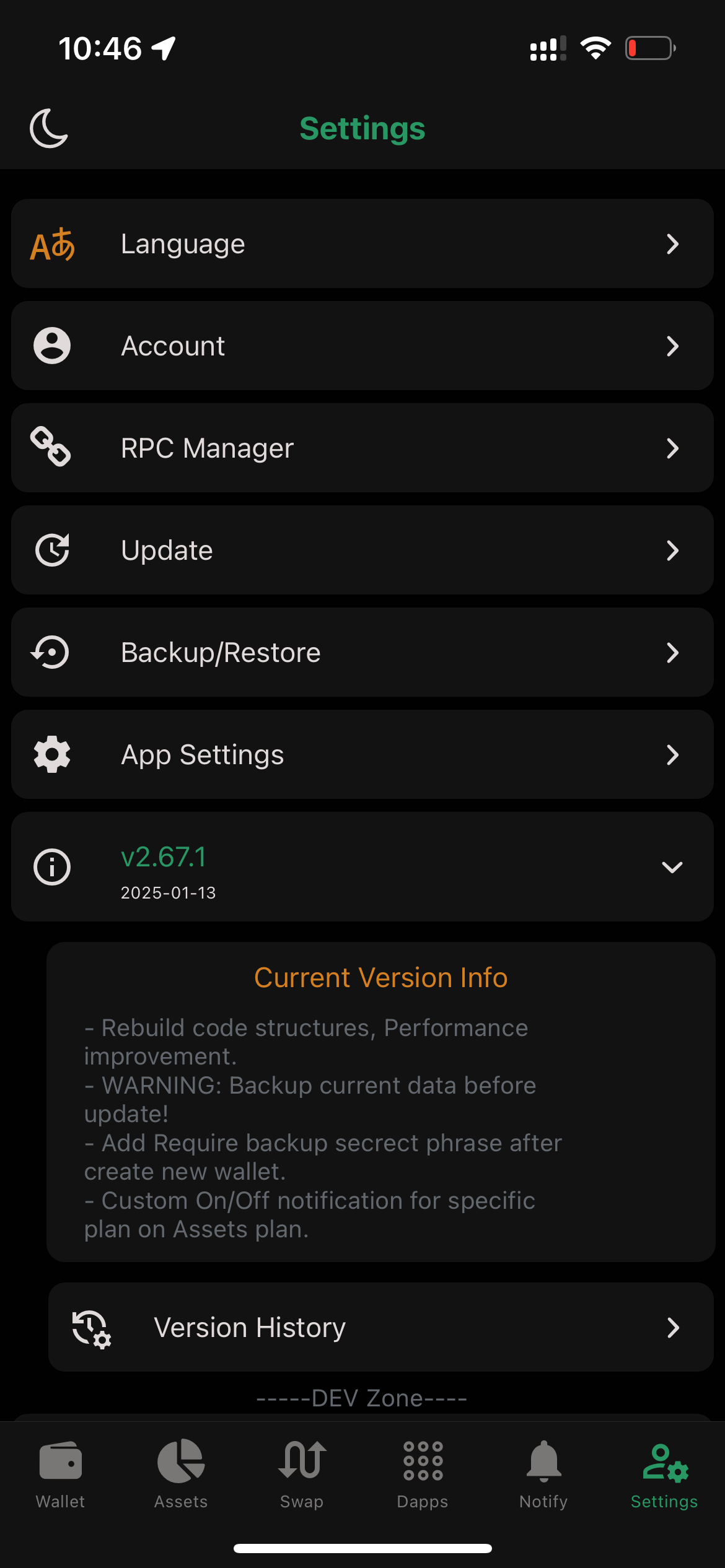
<h2 class="anchor anchorWithStickyNavbar_LWe7" id="step-1-go-to-settings">Step 1: Go to Settings<a href="https://ray.ac/blog/upgrade-app-2-67-1#step-1-go-to-settings" class="hash-link" aria-label="Direct link to Step 1: Go to Settings" title="Direct link to Step 1: Go to Settings">​</a></h2>
<ol>
<li>Open the app and go to the <strong>Settings</strong> page.</li>
<li>Tap on the <strong>version number</strong> (currently 2.66.10 or already 2.67.1).</li>
</ol>
<h2 class="anchor anchorWithStickyNavbar_LWe7" id="step-2-choose-version-history">Step 2: Choose Version History<a href="https://ray.ac/blog/upgrade-app-2-67-1#step-2-choose-version-history" class="hash-link" aria-label="Direct link to Step 2: Choose Version History" title="Direct link to Step 2: Choose Version History">​</a></h2>
<!-- -->
<ul>
<li>
<img src="https://ray.ac/img/blog/1.PNG" width="300">
</li>
</ul>
<ol>
<li>In the settings page, tap on <strong>Version History</strong>.</li>
</ol>
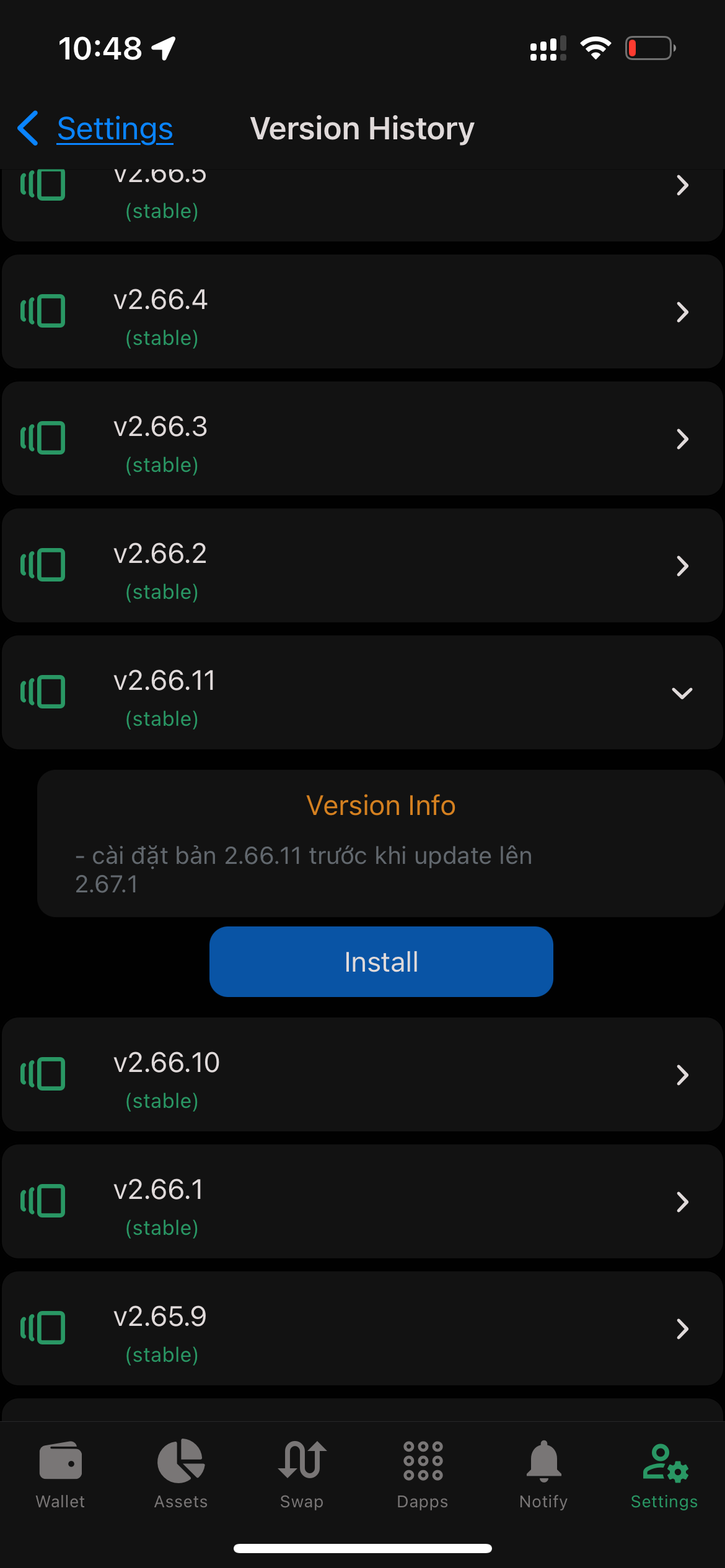
<h2 class="anchor anchorWithStickyNavbar_LWe7" id="step-3-install-26611">Step 3: Install 2.66.11<a href="https://ray.ac/blog/upgrade-app-2-67-1#step-3-install-26611" class="hash-link" aria-label="Direct link to Step 3: Install 2.66.11" title="Direct link to Step 3: Install 2.66.11">​</a></h2>
<ol>
<li>From the Version History page, select <strong>2.66.11</strong>.</li>
<li>Tap to install <strong>2.66.11</strong>.</li>
</ol>
<ul>
<li>
<img src="https://ray.ac/img/blog/2.PNG" width="300">
</li>
</ul>
<h2 class="anchor anchorWithStickyNavbar_LWe7" id="step-4-data-migration">Step 4: Data Migration<a href="https://ray.ac/blog/upgrade-app-2-67-1#step-4-data-migration" class="hash-link" aria-label="Direct link to Step 4: Data Migration" title="Direct link to Step 4: Data Migration">​</a></h2>
<ol>
<li>After installing 2.66.11, the data will be migrated automatically.</li>
<li>Now the app is ready to upgrade to <strong>2.67.1</strong>.</li>
</ol>
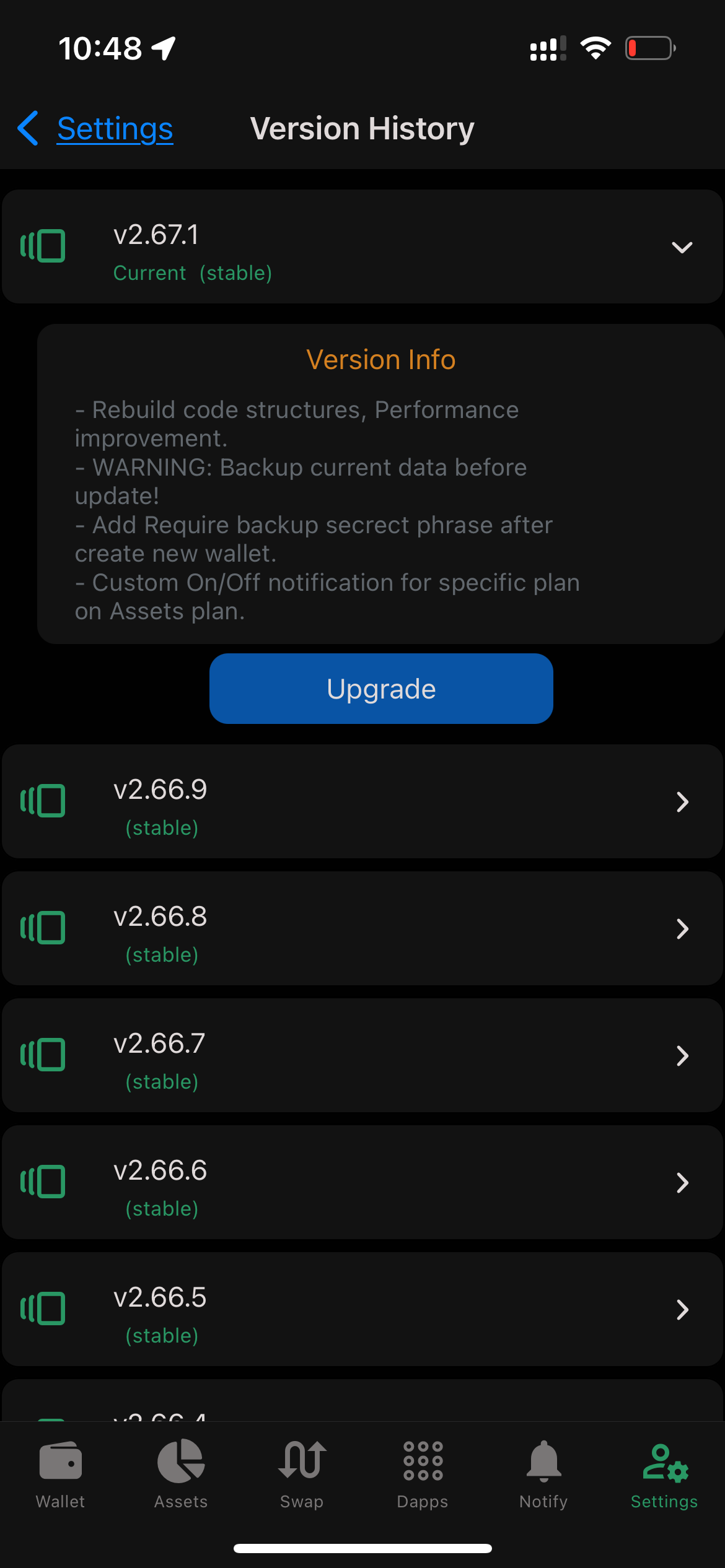
<h2 class="anchor anchorWithStickyNavbar_LWe7" id="step-5-upgrade-to-2671">Step 5: Upgrade to 2.67.1<a href="https://ray.ac/blog/upgrade-app-2-67-1#step-5-upgrade-to-2671" class="hash-link" aria-label="Direct link to Step 5: Upgrade to 2.67.1" title="Direct link to Step 5: Upgrade to 2.67.1">​</a></h2>
<ol>
<li>Go back to the <strong>Version History</strong> page.</li>
<li>Select <strong>2.67.1</strong> from the version list.</li>
<li>Tap to install <strong>2.67.1</strong>.</li>
</ol>
<ul>
<li>
<img src="https://ray.ac/img/blog/3.PNG" width="300">
</li>
</ul>]]></content>
        <author>
            <name>RaydotAc</name>
            <uri>https://github.com/raydotac</uri>
        </author>
        <category label="Upgrade" term="Upgrade"/>
    </entry>
</feed>